


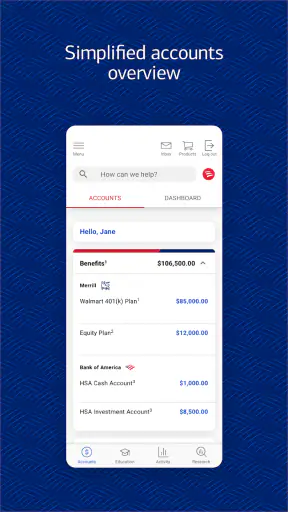
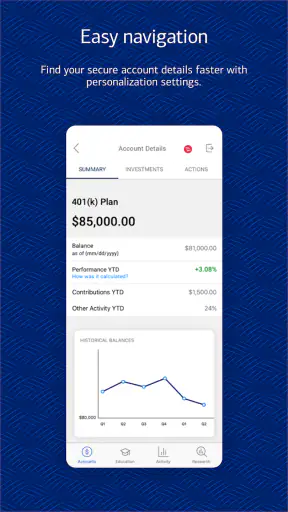

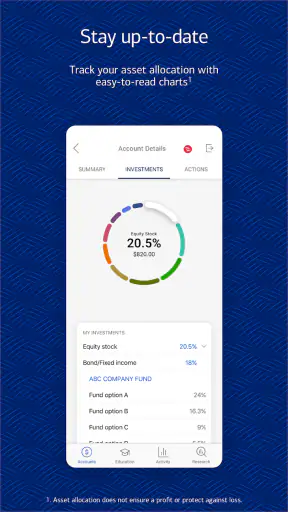
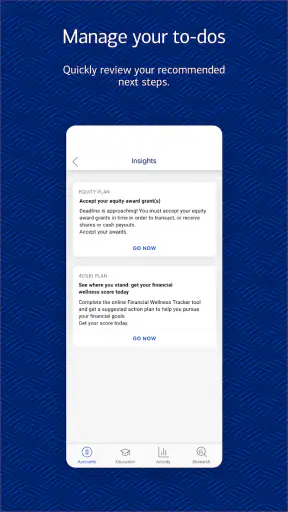
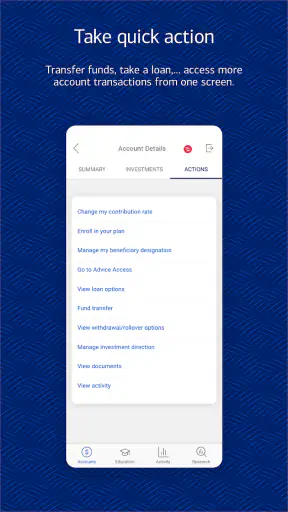
Benefits OnLine is a finance app focused on retirement and benefit services from Merrill Lynch, Pierce, Fenner, and Smith Inc. I approached it less like a general banking app and more like a digital doorway to workplace benefits: useful when I need to check retirement-related information connected with my employer, but not designed to replace a complete personal finance dashboard.
The main capability that shapes the experience is centralized access to retirement and benefit information. That sounds straightforward, yet it matters because workplace benefits are often scattered across enrollment messages, employer portals, paper statements, and separate account tools. When I want to understand what is available through work, the value is having a dedicated place to start rather than searching through unrelated financial apps.
It is free to download and carries an Everyone content rating, so the basic barrier to trying it is low. The app has passed the one-million-install mark and holds an average rating of 3.5 from roughly three thousand ratings, with about a thousand written reviews. Those figures suggest a service that many people use, while also hinting that the experience can depend heavily on the employer arrangement and the task a person is trying to complete.
What the central benefit view changes
In my experience, the strongest reason to use Benefits OnLine is not constant daily browsing. Retirement information is usually something I check when a decision is approaching: reviewing a contribution, looking at an account before changing a payroll election, checking a benefit detail during a job transition, or confirming that I am looking in the right place before contacting support.
That makes the app more like a reference tool than a spending companion. A typical banking app encourages frequent checks of balances and transactions. A budgeting app helps categorize purchases. Benefits OnLine serves a narrower purpose, and that narrowness is actually helpful when I do not want retirement information mixed with credit cards, checking accounts, or investment news.
The practical effect is reduced searching. Instead of beginning with a broad question such as “Where can I find my workplace retirement information?”, I can open the service intended for that relationship. The app’s usefulness therefore depends on whether my employer’s benefits are connected to the Merrill Lynch service. If they are, the focused design can be more efficient than a general-purpose finance app. If they are not, downloading it will not turn it into a universal retirement tracker.
One important distinction is that this is not simply a personal net-worth app with a retirement label. Its identity is tied to employer-linked retirement and benefit services. I would not choose it as my only tool for comparing every account I own, building a household budget, or monitoring spending across several banks. I would choose it when my workplace benefits are the subject of the question.
How I would use it during an ordinary workday
Imagine I receive a payroll notification and want to review my retirement contribution before making any change. I open Benefits OnLine, sign in through the available account process, and use the benefit-focused environment to orient myself. The important advantage is context: I am looking at the service associated with workplace benefits rather than trying to infer retirement details from a regular bank balance.
That workflow is especially useful when I am preparing for a conversation with human resources. I can first review the information available in the app, note the specific point that is unclear, and then ask a focused question. This is a better use of time than contacting support with only a vague concern about “my retirement account.” The app can act as a first check before I escalate an issue.
I also see value during annual benefits decisions. Even when I do not change anything, opening the app can help me reconnect with the details of the plan I already have. The key habit is to treat the app as a place for verification and preparation, not as a substitute for reading official plan information or understanding the consequences of a contribution decision.
My advice is to install it before an urgent deadline, not on the day a decision is due. Financial apps can involve account access steps, identity checks, or unfamiliar navigation. Giving myself time to sign in and locate the relevant area avoids turning a simple review into a last-minute problem. I would also keep any employer instructions nearby, because the correct path may depend on how the workplace has arranged its benefits service.
Another useful habit is separating “what the app shows” from “what I intend to do.” I might use the app to review a current benefit detail, but I would pause before changing a contribution or making an investment-related decision. The interface can make information easier to find; it cannot decide whether a change fits my salary, emergency savings, tax situation, or long-term plan.
The best scenario for this focused design
The app makes the most sense for an employee whose workplace uses Merrill Lynch for retirement or benefit services and who wants a mobile way to revisit that information. In that situation, the focused scope is a strength. I do not need a shopping list of financial tools when my immediate need is to understand the benefits connected to my job.
A realistic example would be someone changing jobs. During that period, retirement information becomes more important, but attention is already divided among payroll, insurance, paperwork, and deadlines. A dedicated benefits app can provide a single familiar starting point for checking the relevant workplace information. I would still verify every transition detail with the responsible plan administrator, but the app can make the first step less confusing.
It can also suit someone who dislikes desktop-only benefit portals. A phone is often more convenient when I am away from a computer, waiting for an appointment, or reviewing documents with a partner. The benefit is not that mobile automatically makes retirement planning easy; it is that access is available in the moments when opening a laptop feels like unnecessary friction.
For a new employee, the app may be useful as part of an orientation routine. I would use it to become familiar with the retirement service, identify the information I need to understand, and write down questions for human resources. That is a more realistic expectation than assuming the app will teach me every financial concept or automatically create a complete retirement strategy.
The app is less compelling for a person who only wants a broad view of all finances. A standard bank app is better for checking everyday cash. A budgeting app is better for spending categories. A portfolio tracker that supports multiple institutions may be better for someone consolidating investments from different providers. Benefits OnLine wins when the question begins with “What is connected to my workplace benefits?” rather than “What is my entire financial picture?”
Where the experience can feel limited
The same specialization that makes Benefits OnLine useful can make it feel incomplete. I would not expect it to replace a financial plan, a tax conversation, or an independent comparison of investment choices. Its job is to provide access to a particular retirement and benefits relationship, not to become a neutral adviser across every possible financial product.
There is also a potential learning curve in the language of workplace benefits. Terms that are familiar to plan administrators may not be obvious to a new employee. If I open the app without knowing what benefit or account I am looking for, I may still need to consult employer materials. A clean mobile entry point helps with access, but it does not remove the need to understand contribution rules, eligibility, or deadlines.
I would also be cautious about judging the app only by how quickly it opens or how attractive the interface feels. Finance apps are valuable when the displayed information is relevant to the user’s actual plan. Two people can have very different experiences because their employers provide different benefit arrangements. That is one reason the average rating of 3.5 should be read as a broad signal, not a guarantee of what my specific workplace setup will feel like.
Another trade-off is the boundary between convenience and security. A mobile app makes benefit information easier to reach, which is useful, but I would avoid using it casually on a shared device or leaving an unlocked phone unattended. I would keep the operating system current, use the device’s normal security protections, and avoid recording sensitive details in unsecured notes. These are practical habits for any finance service, but they matter more when retirement information is available from a phone.
The minimum operating system is version 11, so older devices may not be eligible. That is a small but important check before planning around the app. The current version is 26.08.02, which tells me the app is actively versioned, but I would still install updates carefully and make sure I can access my benefits through the appropriate alternative channel if I ever need information while the app is unavailable.
I would not rely on the app alone for a deadline-sensitive action. If a contribution change, enrollment choice, or employment transition matters, I would confirm the effective date and the responsible contact through the official workplace materials. The app can be the place where I review information, but a retirement decision deserves a second look when timing or payroll is involved.
Three smarter ways to get value from it
First, I would use the app before asking a general question. Instead of contacting human resources with a broad request, I would inspect the relevant benefit area, identify the exact wording that causes confusion, and then ask about that point. This turns the app into a preparation tool and can make support conversations more productive.
Second, I would create a personal review routine around life events rather than checking it compulsively. A job change, a salary change, an annual enrollment period, or a major household decision is a sensible reason to revisit workplace benefits. That approach respects the app’s focused purpose and avoids mistaking frequent screen time for meaningful retirement planning.
Third, I would compare the app’s information with my own records before acting. If I am reviewing a contribution or benefit detail, I would note the date of the information and compare it with a recent payroll statement or employer communication. This is not distrust of the app; it is a sensible way to catch timing differences between payroll, plan administration, and mobile presentation.
A fourth useful approach is to use it as a question generator. After reviewing the available information, I might ask whether a contribution is pre-tax or after-tax, when an election becomes effective, or which team handles a particular issue. The app does not need to answer every question directly to be useful; it can help me discover which questions I should ask next.
Who should install it, and who should choose something else
I would recommend Benefits OnLine to employees whose retirement or benefit services are handled through Merrill Lynch and who want a mobile access point. It is also a reasonable choice for people who prefer checking official workplace information themselves before calling support. The free price makes trying it straightforward, and the Everyone rating means it is presented for a general audience rather than a restricted age group.
I would be more hesitant to recommend it as a first choice for freelancers, people whose retirement accounts are spread across unrelated providers, or anyone looking for detailed household budgeting. Those users may get more value from a broad financial aggregation tool, a dedicated budgeting app, or the direct mobile service of their actual account provider.
It is also not the right choice for someone expecting personalized financial advice simply because retirement information appears in the app. I would use it to access and review benefit details, then make decisions with appropriate research or professional guidance when the choice is complex. Convenience should improve my process, not replace judgment.
Developed by Merrill Lynch, Pierce, Fenner, and Smith Inc., the app has been available since October 1, 2018, and its continued presence alongside more than one million installs shows that it serves a substantial audience. Still, its value is situational. The number of installs does not tell me whether it fits my employer, and the rating does not replace testing the actual workflow I need.
After using Benefits OnLine, my view is positive but deliberately narrow: it is a practical access point for workplace retirement and benefit information, not an all-purpose finance command center. I would keep it installed if my employer’s benefits are supported and I regularly need to review them from a phone. I would skip it if I need cross-bank budgeting, broad investment tracking, or advice beyond the scope of an employer-linked service.
The best way to judge it is to begin with one concrete task. Try locating the retirement or benefit information you actually need, then see whether the app makes that task clearer than the usual desktop portal or a general finance app. If it does, its focused design is doing exactly what it should. If it leaves you searching for unrelated financial answers, that is a sign you need a different tool alongside it, not necessarily a reason to expect this app to become something it was not built to be.


